
Blood Flow Restriction (BFR) Training System
SmartCuffs 4.0
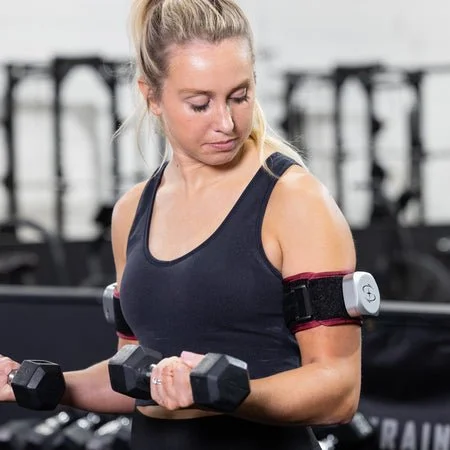
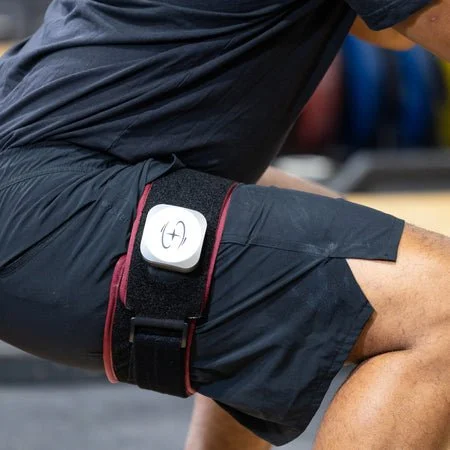
A wireless BFR cuff system designed to provide controlled limb occlusion pressure during low-load exercise and rehabilitation.
No payment is taken now. We confirm availability and send an itemized total first.
Requires a smartphone with Bluetooth and a SmartCuffs app account.
Already renting? Setup guide and video

Key features
SmartCuffs 4.0 uses individualized limb occlusion pressure calibration and multiple pressure modes. The manufacturer describes continuous, intermittent and resting BFR modes for different training and rehabilitation applications.
- Provides individualized pressure calibration rather than a one-size-fits-all setting.
- Wireless design with built-in pumps simplifies setup.
- Multiple BFR modes allow different training and recovery approaches.
- Bluetooth connectivity supports control and tracking through the SmartCuffs app.
How it fits into your recovery
BFR is most useful during a specific rehabilitation or training block. Renting means you can follow that block properly without owning a system you will not need afterwards.
| Guided rehabilitation | Directed by a provider or qualified professional |
|---|---|
| Low-load strength work | When heavy loading is not appropriate yet |
| De-loading joints | During rehabilitation from a joint injury |
| Structured training programs | Where BFR is already part of the plan |
What renting this actually looks like
Five stages, and a person at Caliber involved in four of them. This is the part that separates us from buying a box online.
Request
You pick the equipment and rental period and send a request. Nothing is charged at this point.
Prepare
We check the motor, the controller and every strap, then set the unit to a neutral starting range.
Deliver
Delivered and assembled in the room you will actually use it in, usually beside a bed or sofa.
Use
Most people run two to three sessions a day. Your provider sets your settings. We leave a quick-start card with setup steps and when to stop.
Return
Call or text to extend weekly, or book a pickup. We collect from your door.
What's included
| Cuffs | SmartCuffs 4.0 wireless cuff pair |
|---|---|
| Charging | Required charging accessory or accessories for the rental set |
| App setup | Pairing instructions and help setting up the SmartCuffs app at delivery. You need a smartphone with Bluetooth and your own app account. |
| Documentation | Caliber quick-start card and manufacturer directions for use |
The final accessory list is confirmed when we acknowledge your request, so you know exactly what arrives before you pay.
Use only with appropriate guidance
Blood flow restriction is specialized equipment. Use SmartCuffs 4.0 according to the manufacturer's directions and under the guidance of a physician, physical therapist or other qualified professional. Review the manufacturer's contraindications and stop-use warnings before beginning a session.
Before it reaches you
The cuffs are charged, inspected and function-tested before delivery. Every rental set is cleaned between rentals, and the required accessories and manufacturer instructions are checked before it leaves Caliber.
Targeted Recovery
Most people rent the Kinetec Spectra Knee CPM alongside the Breg Polar Care Wave. Together they are priced as a set.
Questions about this rental
-
We ask that you are working with a provider or qualified professional who has directed BFR as part of your program. We can explain what the device does, but we cannot direct your training.
-
Yes, with a smartphone that has Bluetooth. The cuffs pair with the SmartCuffs app, and you will need your own app account to sign in. We help you install and pair it at delivery. Check your phone model in the app store listing before you request, or call us if you are not sure.
-
The standard rental is a pair. If your provider has specified a different setup, contact Caliber before submitting your request.
-
Every returned unit is inspected and cleaned using the manufacturer's own cleaning instructions, then function-tested before it goes out again.
-
Call or text us. We will troubleshoot over the phone and, if the unit needs replacing, arrange a swap. Please do not attempt repairs yourself.